AI-owned script execution
The features on this page require Freeplane 1.13.3 or later.
This page covers the AI-owned script host, not the normal
Edit script window.
For AI help inside the normal script editor, see
AI formulas and script editing.
Benefits and risks
Benefits:
- AI can compile and run its current AI-owned script against the current map selection,
- shown mode keeps a manual review step,
- hidden direct run can speed up iterative scripting when you intentionally accept the risk.
Risks:
- this is one of the highest-risk AI features in Freeplane,
- models make mistakes,
- prompt injection through map content or scripts cannot be fully excluded,
- restricted external permissions can reduce some risks, but they do not make unreviewed execution safe.
Direct AI script execution
To use this:
AI tool availabilitymust includeScript execution.AI-owned script execution policymust beHidden, AI may run directly.
If the script needs unrestricted file, write, network, or external
process access, enable the corresponding AI-owned script may ... without restriction settings.
Benefits:
- AI can execute its current AI-owned script without waiting for manual review,
- this can speed up repeated compile-run-repair cycles.
Risks:
- there is no user review step before execution,
- the external-permission toggles can reduce some risks, but they do not make unreviewed execution safe.
For AI-started direct runs, AI-owned dialog Run permissions does not
control the execution. Direct AI runs use the four
AI-owned script may ... without restriction settings.
User-reviewed AI-owned script execution
To use this:
AI tool availabilitymust includeScript execution.AI-owned script execution policymust beShown, user must press Run.
Benefits:
- Freeplane shows the AI-owned script before it runs,
- you keep a manual review step.
Risks:
- user review reduces risk, but it does not guarantee safety,
- scripts can still be wrong, unsafe, or produce unwanted UI effects.
In shown mode, Freeplane opens a review dialog so you can inspect the script before running it.
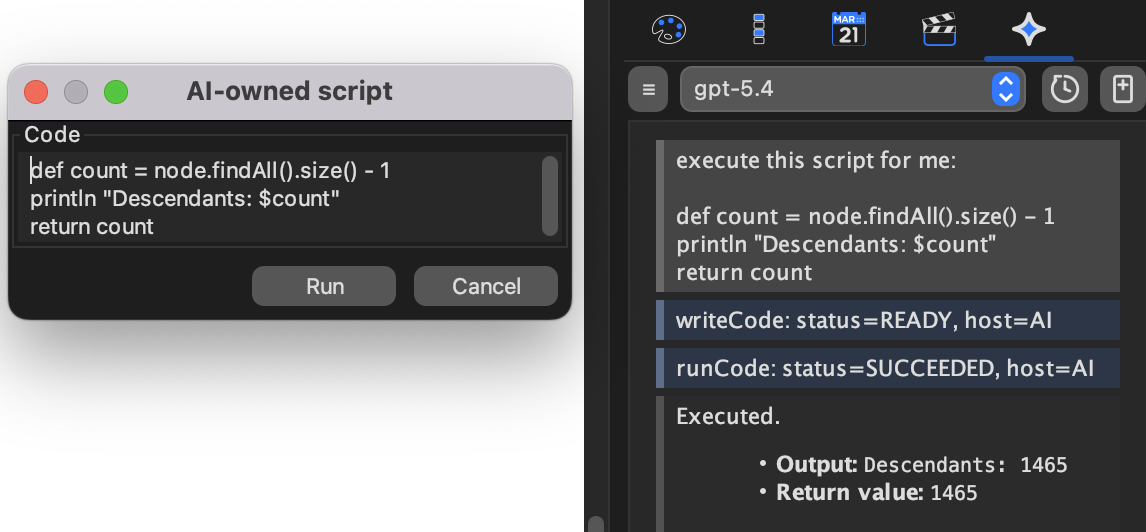
Shown mode is a review gate. The dialog is for script inspection and Run/Cancel only.
The shown dialog is not a results window. If you later see a popup with script output, that popup usually comes from the script itself.
Arguments and run feedback
AI-owned scripts can have Groovy source code and separate
Arguments JSON. The script receives the parsed JSON value as args;
a blank field means args == null.
In shown mode, review both the source code and the arguments before you
press Run. Invalid JSON prevents the script from running until it is
fixed.
When a user-reviewed AI-owned script finishes, fails, or is cancelled,
Freeplane reports the result back into the chat so the assistant can
continue from what actually happened. If the script uses println, the
output is available to AI and is also written to the normal script
output panel or log.
AI-owned dialog Run permissions
This section matters only in shown mode, when the user presses Run in
the AI-owned script dialog.
To use this:
AI tool availabilitymust includeScript execution.AI-owned script execution policymust beShown, user must press Run.
AI-owned dialog Run permissions controls which external permissions a
user-started Run from that dialog uses:
Unrestricted external permissionsUse AI-specific external permissions
If you choose AI-specific permissions, the four
AI-owned script may ... without restriction settings below determine
what the script may do.
Benefit:
- shown mode lets you keep a review step and still restrict file, write, network, and external-process access.
Risk:
- even in shown mode, no permission combination can make a bad script safe by itself.
AI-owned external-permission settings
These settings matter whenever AI-owned script execution is enabled:
AI-owned script may read files without restrictionAI-owned script may write files without restrictionAI-owned script may use network without restrictionAI-owned script may execute external processes without restriction
Benefits:
- they let you narrow what AI-owned scripts are allowed to do,
- they are especially useful when you keep shown review mode.
Risks:
- enabling broader permissions increases the impact of model mistakes,
- if network access is allowed, the practical risk can be higher than in a no-network setup.